
How eFiler365 works · architecture, security and your data
Three parts. Your email stays with you.
eFiler365 has an Outlook add-in where people file, the eFiler365 Hub that coordinates, and eFiler Sync, which does the work inside your own environment. Your email and your search index stay with you.
No set-up fee · Uses your existing folders
01 — Filing
When you file an email
- Outlook add-in. You file an email, or an eFiler365+ rule matches it.
- eFiler365 Hub. Queues the filing instruction. It holds your settings, never your email.
- eFiler Sync, in your environment. Downloads the message from your mailbox, saves it to the destination as a standard .eml file, and updates the search index as it goes.
- Your storage. SharePoint, OneDrive, Autodesk Forma (formerly Autodesk Docs), Egnyte, Google Drive or file servers. The email is marked as filed in Outlook, so every colleague can see where it went.
02 — Searching
When you search
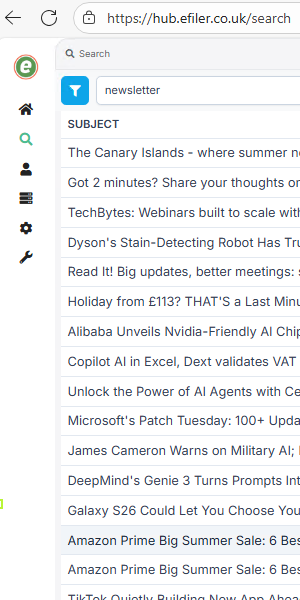
The index is built in the background as email is filed, so results are instant rather than built when you search.
- Any browser. Search from the Hub, or from a location in the Outlook pane.
- eFiler365 Hub. Confirms who you are and passes your search on.
- eFiler Sync index, in your environment. Searches its own index and keeps only results you are allowed to open.
- Results. Preview, reply, forward, print or download.
03 — The parts
What each part does
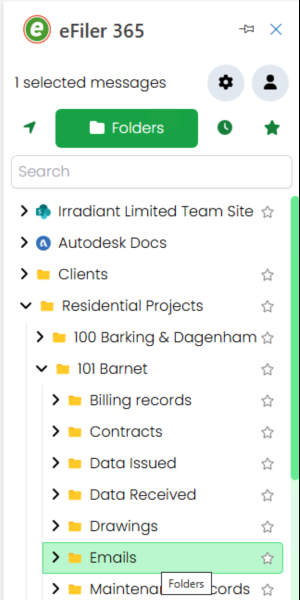
eFiler365 add-in
A Microsoft web add-in that runs in new Outlook, Classic Outlook, Outlook on the web, Mac, iPhone and Android. Users add it from the Microsoft store inside Outlook, with no manifest files to find or upload, or IT assigns it to everyone from the Microsoft 365 Admin Center.
eFiler365 Hub
The web portal at hub.efiler.co.uk. Admins connect storage, share locations, enforce settings, set rules and manage licences. Anyone can search from it in a browser.
eFiler Sync
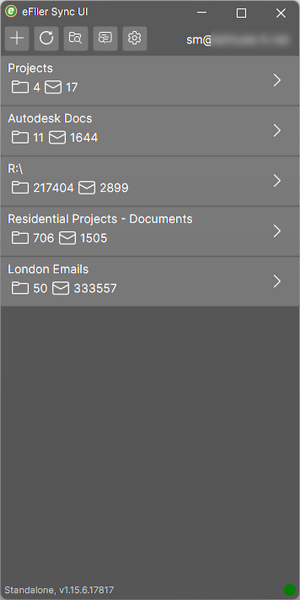
A service you run in your own environment, needed for every destination. It downloads filed email from the mailbox, saves it to your cloud or network storage, and keeps the search index up to date. It connects out to the Hub, so no inbound firewall ports need opening.
04 — eFiler Sync
Two ways to run it
Server mode, best in almost all cases
An admin installs it as a service on a server that is always on, on Windows or Linux, for one user or many. Processing is central, with one shared index for the whole team, shared filing locations, filing and search around the clock, and lighter use of Autodesk’s API.
Standalone
Installed on each user’s PC and active while they are signed in. Each copy works independently, with no shared processing and none of the shared benefits of server mode. Suits individuals or small teams with no server.
05 — Security
Security and your data
Where is my email stored?
Only in your own storage, as a standard .eml file in the folder you chose. eFiler does not keep a copy.
Where is the search index kept?
With eFiler Sync, inside your environment. In server mode that is one central index on your server.
What does the Hub hold?
Your company settings, users, licences, filing rules, and the storage connections you authorise. It passes filing instructions and searches between the add-in and eFiler Sync.
Which Microsoft permissions does eFiler365 use?
Delegated permissions only, so eFiler365 acts for each signed-in user. The first user must be a global administrator to approve them, and your admins can review them at any time in Microsoft Entra ID.
Who can see what in search?
Search results follow the permissions on your storage, including SharePoint folder permissions. People only find email they are allowed to open.
How are Hub accounts protected?
Microsoft sign-in or a Hub password, with multi-factor authentication by email code or an authenticator app, and role-based admin rights.
06 — Design
Why it is built this way
Emails are stored once, governed once and found when needed, without creating a parallel system.
No migration
eFiler365 works with the folders you already have and indexes the .msg and .eml files already in them.
No lock-in
Filed email is a standard file in your storage. Stop using eFiler365 and every email is still there.
Your governance
Data residency, retention, auditing and data-loss protection all come from the storage you already manage.
eFiler365 featuresFiling, automation, search and plans
eFiler365 vs eFiler ClassicWhich eFiler is right for you
Moving to new OutlookBring your email filing with you